

























Bitunix has just changed the game for active crypto traders. With the launch of its world-first 16-chart multiwindow trading system, paired with powerful new tools like Stop-Loss/Take-Profit (SL/TP) for Spot and zero-fee token Convert, the exchange is giving desktop users pro-level control and speed like never before.
Key Takeaways:
- Bitunix now supports live trading on up to 16 charts simultaneously.
- SL/TP orders are now available for Spot trades, a rare feature in crypto.
- Convert tokens instantly with no fees or slippage, right on the platform.
Multi-Chart Trading: Trade Across 16 Pairs Simultaneously
Finally, a proper use case for your brand new overpriced 4K screen! In a move no other crypto exchange was crazy enough to implement (yet), Bitunix now lets you monitor and trade up to 16 pairs live from a single desktop screen. Each chart operates independently, offering full execution power in real time. You can have different coins and different indicators on each chart, it’s all up to you.
This upgrade isn’t just for looks. It’s designed for serious traders who need fast decisions, precise strategy, and total visibility. Whether you’re scalping BTC, watching SOL breakouts, or running complex hedging strategies, you can now do it all at once.
Key highlights:
- Fully interactive multi-chart layout (2–16 charts)
- Direct trading from each chart window
- Native integration with Spot and Futures without third-party tools or APIs
- Custom indicators, chart types, and timeframes per window
This is professional-grade functionality, now baked into the Bitunix desktop platform.
How to Use the 16-Chart Multiwindow Setup
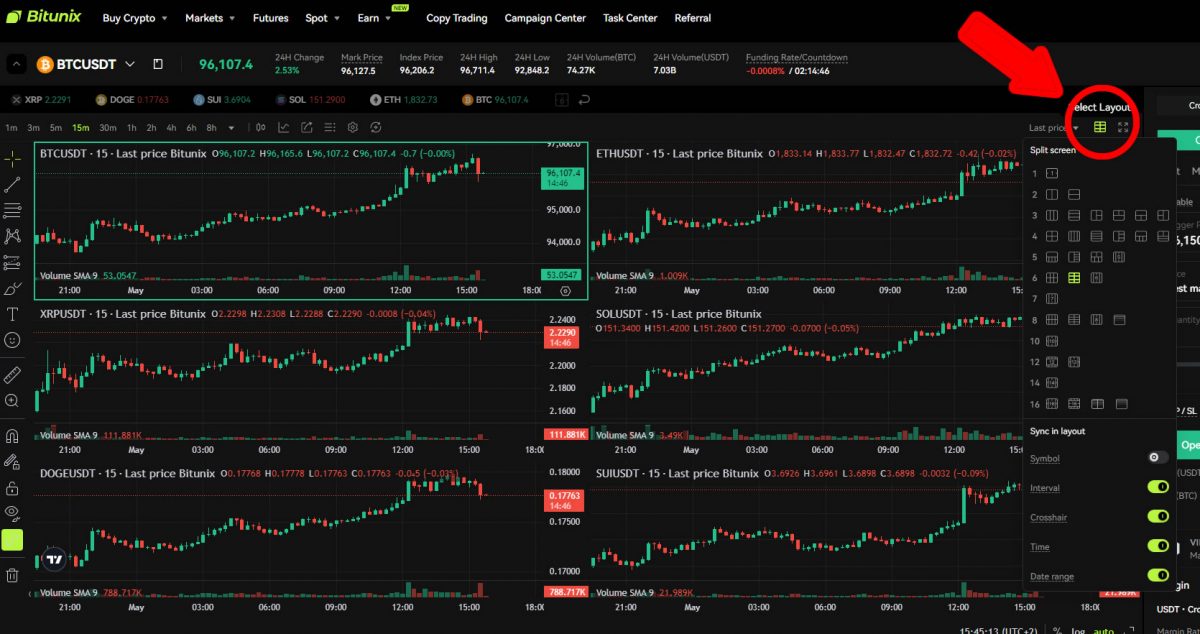
Getting started is simple:
- Log in to Bitunix on desktop
- Open any Spot or Futures pair
- Click “Multiwindow Layout”
- Choose your layout (2×2, 4×4, etc.)
- Assign trading pairs and customize each chart
- Trade directly from each window in real time
It’s a clean, powerful way to manage multi-market strategies without tab-switching or lag. You can monitor different coins, on different timeframes, and with different chart indicators. For professional traders who need advanced multi-chart trading on the same screen, Bitunix delivers.
Stop-Loss / Take-Profit Comes to Spot Trading
Bitunix now lets you protect trades even when you’re offline. With SL/TP (Stop-loss/Take-profit) orders now available in Spot trading, you can automate risk control with ease.
Here’s what you can do:
- Set SL/TP directly within the Spot order panel
- Use your existing Spot wallet funds, no transfers needed
- Track SL/TP status linked to each open position
This feature is not so common exchanges, but it’s now live on Bitunix. On most exchanges, stop-loss and take-profit orders are typically only available on derivatives markets. Our Bitunix review already mentions how this exchange mainly focuses on expert Futures traders. Therefore, seeing such a huge UI improvement coming to Spot trading is a big deal.
That’s not the only improvement, because a simple spot-based Convert feature has also been implemented.
Convert Tokens Instantly
Need to rebalance your portfolio fast? The new Convert function lets you swap tokens instantly, with no fees, no slippage, and no waiting on order books.

To use Convert:
- Head to the Bitunix app or website
- Tap “Convert”
- Choose a pair, enter the amount
- Confirm the quote and done – your swap is complete
This is perfect for quick reallocation during volatile markets. Keep in mind that a 0.3% price spread may be applied in quick conversions, despite the zero-fee claims. Nevertheless, adding quick convert is a big step toward making trading more beginner-friendly on Bitunix.
Bitunix Keeps Growing
Bitunix isn’t just adding features, it’s redefining what a crypto exchange platform should offer in 2025:
- Full trading execution across 16 live charts
- Risk-managed Spot trading with SL/TP orders
- Instant, fee-free swaps with the Convert tool
Few weeks ago, Bitunix also launched ultra chart trading on their mobile app. This improvement lets you trade directly on charts with drag and drop orders, plus adds full TradingView support with over 100 indicators. Days before that, the platform also added flexible staking feature, plus another batch of UI improvements!
These tools reduce friction, maximize control, and help you respond to markets faster than ever.

Ready to step up your trading game? Log in on desktop to explore the 16-Chart system, or use the Bitunix app to try SL/TP and Convert. This isn’t just a tech upgrade: it’s a serious edge for any trader who wants speed, control, and execution power all in one place.